
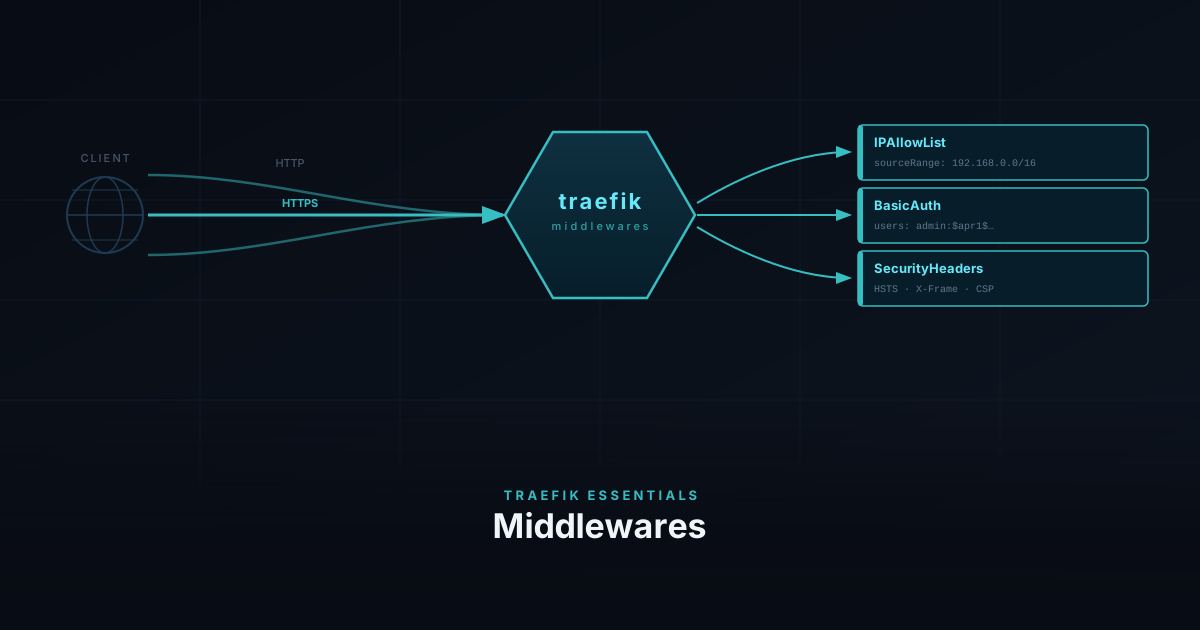
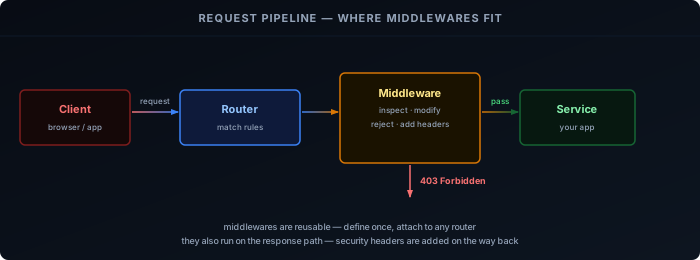
When a request reaches Traefik, it is matched against a router. Before that request is forwarded to your service, middlewares have a chance to inspect or modify it. A middleware can reject the request outright (wrong IP, missing credentials), rewrite headers, or add security headers to the response on the way back.
Middlewares are reusable — you define one and attach it to as many routers as you want. You never change the app itself.
Prerequisites
- Traefik running — see the installation guide
How Middlewares Work
Each middleware has two parts: a definition (what it does and how it is configured) and an attachment (which routers it applies to).
In Docker, both happen in labels on the service container. For bare metal, or when you want to share a middleware across many services, you define them once in a conf.d/ file and reference them by name from any router.
Throughout this guide we use lan-only, my-auth, and secure-headers as the middleware names. You can name them anything — the name is just how Traefik identifies them internally.
IPAllowList
IPAllowList lets requests through only if the source IP matches an allowed range. Everything else gets a 403 immediately, before the request reaches your service.
This is useful for services that should only be reachable from your home network — Grafana, Home Assistant, internal dashboards.
labels:
  - "traefik.http.middlewares.lan-only.ipallowlist.sourcerange=192.168.0.0/16,127.0.0.1/32"
- "traefik.http.routers.myapp.middlewares=lan-only"For bare metal, or to reuse the middleware across multiple services, define it once in a shared file:
http:
  middlewares:
    lan-only:
      ipAllowList:
        sourceRange:
          - "192.168.0.0/16"
- "127.0.0.1/32"Then reference it by name from any router config:
http:
  routers:
    myapp:
      rule: "Host(`myapp.example.com`)"
      entryPoints: [websecure]
      middlewares: [lan-only]
      service: myapp
      tls:
certResolver: letsencryptBasicAuth
BasicAuth adds a username/password prompt in the browser before the request reaches your service. The browser sends the credentials as a base64-encoded header on every request — Traefik checks the hash and either forwards or rejects.
This is a good fit for services that have no built-in login page, like Prometheus or a simple status page.
First, generate a hashed password with htpasswd:
sudo apt install apache2-utils
htpasswd -nb admin your-password
# admin:$apr1$xyz...Copy the full output — you need the hash, not the plain password.
In Docker labels, every $ in the hash must be escaped as $$ because Docker interprets single $ as a variable:
labels:
  - "traefik.http.middlewares.my-auth.basicauth.users=admin:$$apr1$$xyz..."
- "traefik.http.routers.myapp.middlewares=my-auth"In dynamic config no escaping is needed — paste the hash directly:
http:
  middlewares:
    my-auth:
      basicAuth:
        users:
- "admin:$apr1$xyz..."Security Headers
Browsers trust a lot of content by default. Security headers are instructions you send back in the HTTP response that tell the browser to be stricter — don’t load this page in an iframe, don’t sniff the content type, only connect over HTTPS.
These headers protect your users even if someone finds a URL to one of your services.
Because there are many options and the values are long, defining them as Docker labels is impractical. Use a dynamic config file:
http:
  middlewares:
    secure-headers:
      headers:
        stsSeconds: 31536000          # tell browsers to use HTTPS for 1 year
        stsIncludeSubdomains: true
        forceSTSHeader: true          # send HSTS even on plain HTTP responses
        contentTypeNosniff: true      # stop browsers guessing content types
        frameDeny: true               # block the page from loading in an iframe
        browserXssFilter: true        # enable browser XSS protection
referrerPolicy: "strict-origin-when-cross-origin"Chaining
You can attach multiple middlewares to a single router. Traefik runs them in the order listed — if one rejects the request, the rest are skipped.
A sensible order for homelab use: filter by IP first (cheapest check), then require auth, then add headers on the way out.
In Docker labels, list them comma-separated:
labels:
- "traefik.http.routers.myapp.middlewares=lan-only,my-auth,secure-headers"In dynamic config:
http:
  routers:
    myapp:
      middlewares:
        - lan-only
        - my-auth
        - secure-headers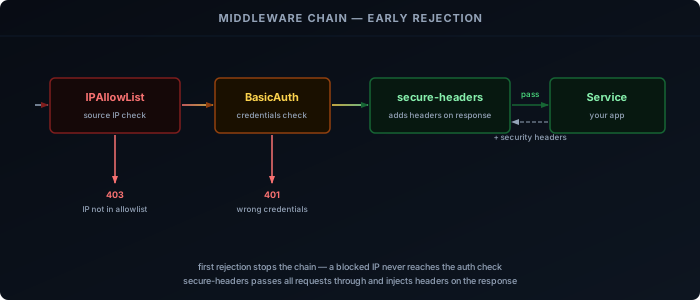
A request from outside your LAN is blocked by lan-only and never reaches my-auth. A request from inside with wrong credentials is blocked by my-auth and never reaches the service. Only a request that passes all checks gets through — and it arrives at your service with the security headers already attached to the response.
With lan-only, my-auth, and secure-headers defined, we can put them to use right away — starting with the Traefik dashboard itself.
What the Dashboard Shows
The Traefik dashboard gives you a live view of everything Traefik has loaded — routers, services, middlewares, and entry points. It is the first place to check when a service is not routing correctly, and the API that powers it can be queried directly from the terminal.
The dashboard has four sections:
- Routers — every routing rule Traefik has loaded, with its current status (green = active, red = error)
- Services — the backends requests are forwarded to, including health check state
- Middlewares — all defined middlewares and which routers they are attached to
- Entry Points — the ports Traefik is listening on (typically
web :80andwebsecure :443)
When a service is not routing, the dashboard tells you whether the router was picked up, whether the TLS certificate resolved, and whether a middleware is rejecting the request before it reaches the service.
Initial Access
From the installation guide, the dashboard is already available on http://<server-ip>:8080 via --api.insecure=true. That is convenient for initial testing, but it exposes the API over plain HTTP with no authentication.
The better approach is to route the dashboard through Traefik itself — behind TLS and your existing middlewares.
Securing the Dashboard
The dashboard is served by api@internal, a built-in Traefik service. You create a router that points to it and attach middlewares exactly as you would for any other service.
Docker
Remove --api.insecure=true from your command flags and add a router via labels on the Traefik container itself:
command:
  - "--api=true"
  - "--api.dashboard=true"
  # remove: --api.insecure=true
  # ... rest of your existing flags

labels:
  - "traefik.enable=true"
  - "traefik.http.routers.dashboard.rule=Host(`traefik.example.com`)"
  - "traefik.http.routers.dashboard.entrypoints=websecure"
  - "traefik.http.routers.dashboard.tls=true"
  - "traefik.http.routers.dashboard.tls.certresolver=le"
  - "traefik.http.routers.dashboard.service=api@internal"
- "traefik.http.routers.dashboard.middlewares=lan-only,my-auth"Replace traefik.example.com with your domain and point a DNS record to your server.
Bare Metal
Add a dynamic config file for the dashboard router. The rule must cover both /api and /dashboard path prefixes — the dashboard UI calls the API internally:
http:
  routers:
    dashboard:
      rule: "Host(`traefik.example.com`) && (PathPrefix(`/api`) || PathPrefix(`/dashboard`))"
      entryPoints: [websecure]
      middlewares: [lan-only, my-auth]
      service: api@internal
      tls:
certResolver: letsencryptUpdate your static config to disable insecure mode:
api:
  dashboard: true
insecure: falseRestart Traefik to apply:
sudo systemctl restart traefikQuerying the API
The API is available under the same domain as the dashboard and accepts the same BasicAuth credentials:
# list all HTTP routers
curl -s -u admin:your-password https://traefik.example.com/api/http/routers | jq

# list all HTTP services
curl -s -u admin:your-password https://traefik.example.com/api/http/services | jq

# list all middlewares
curl -s -u admin:your-password https://traefik.example.com/api/http/middlewares | jqFurther Reading
The three middlewares above cover the most common homelab needs, but Traefik has many more — rate limiting, redirects, compression, and request rewriting among them. The full list is in the Traefik middleware documentation . The full API endpoint reference is in the Traefik API documentation .