
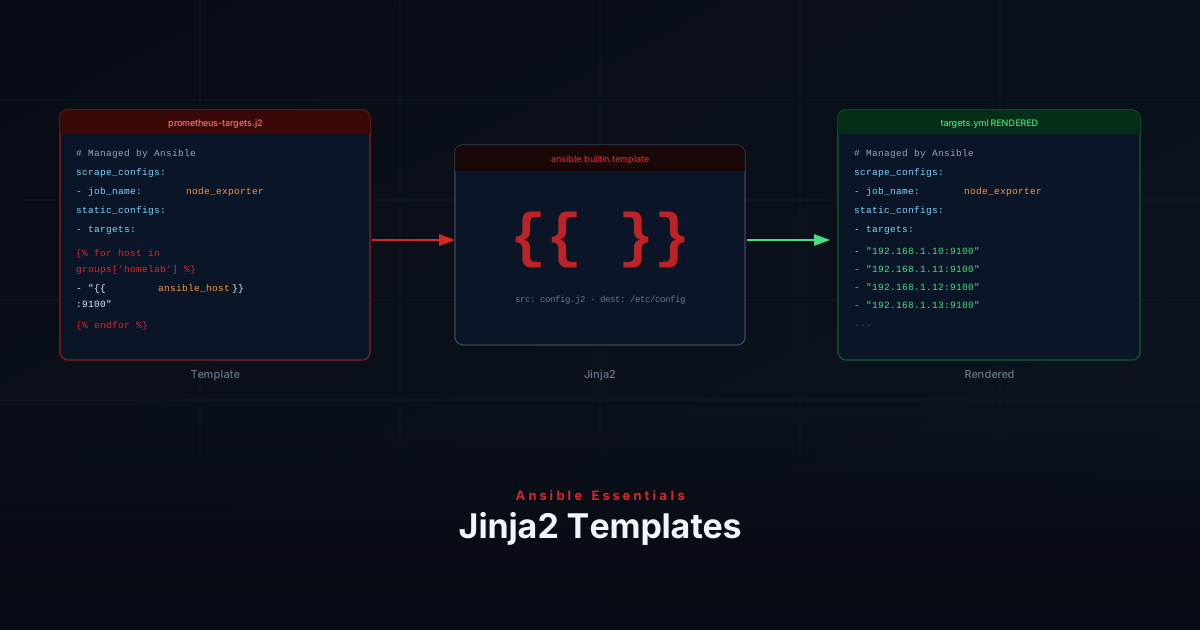
Instead of hardcoding values in every task, you define variables once and reference them everywhere. Facts go further — Ansible automatically discovers information about each host that you can use without defining anything manually. Once you have variables and facts to work with, Jinja2 templates let you project them into config files — instead of maintaining ten nearly identical files by hand, you write a single file with placeholders that Ansible fills in per host at deploy time.
Variable Sources
| Source | Scope | Example use |
|---|---|---|
group_vars/all.yml | All hosts | NTP server, DNS |
group_vars/<group>.yml | Hosts in a group | Subnet per VLAN |
host_vars/<host>.yml | Single host | Per-host port |
Playbook vars: | Current play | One-off overrides |
host_vars overrides group_vars, which overrides all. Playbook vars: overrides all of these.
Defining Variables
homelab-ansible/
├── group_vars/
│   ├── all.yml
│   └── servers.yml
└── host_vars/
└── web01.ymlntp_server: "pool.ntp.org"
timezone: "Europe/Amsterdam"http_port: 8080Use them in tasks with {{ variable_name }}:
- name: Set timezone
  community.general.timezone:
name: "{{ timezone }}"Ansible Facts
When gather_facts: true (the default), Ansible collects system information from the host at the start of each play.
| Fact | Example value |
|---|---|
ansible_hostname | web01 |
ansible_default_ipv4.address | 192.168.1.10 |
ansible_distribution | Ubuntu |
ansible_os_family | Debian |
ansible_memtotal_mb | 7976 |
To see all available facts for a host:
ansible web01 -m setupUsing Facts in Tasks
- name: Install packages (Debian)
  ansible.builtin.apt:
    name: curl
    state: present
  when: ansible_os_family == "Debian"

- name: Install packages (RedHat)
  ansible.builtin.dnf:
    name: curl
    state: present
when: ansible_os_family == "RedHat"Registering Task Output
Use register to capture a task result and act on it:
- name: Check if nginx is running
  ansible.builtin.systemd:
    name: nginx
  register: nginx_status
  changed_when: false
  failed_when: false

- name: Start nginx if not running
  ansible.builtin.systemd:
    name: nginx
    state: started
when: nginx_status.status is defined and nginx_status.status.ActiveState != "active"The debug Module
Use debug to inspect variables while developing:
- name: Show host IP
  ansible.builtin.debug:
    msg: "Host IP is {{ ansible_default_ipv4.address }}"

- name: Dump all facts
  ansible.builtin.debug:
var: ansible_factsNow that you have variables and facts to work with, let’s put them to use: projecting them into real configuration files with Jinja2 templates.
Template Syntax
Templates are plain text files ending in .j2 with three main expressions:
| Syntax | Purpose |
|---|---|
{{ variable }} | Insert a variable value |
{% if condition %} | Conditional block |
{% for item in list %} | Loop |
Where Templates Live
Place templates inside your role under a templates/ directory:
roles/
└── monitoring/
    ├── tasks/
    │   └── main.yml
    └── templates/
└── prometheus-targets.j2The template Module
Use template instead of copy whenever you need variable substitution:
- name: Deploy Prometheus scrape config
  ansible.builtin.template:
    src: prometheus-targets.j2
    dest: /etc/prometheus/targets.yml
    owner: prometheus
    group: prometheus
    mode: '0644'
notify: Reload PrometheusWriting a Template
This template generates a Prometheus scrape config from your inventory:
# Managed by Ansible — do not edit manually
scrape_configs:
  - job_name: node_exporter
    static_configs:
      - targets:
{%- for host in groups['homelab'] %}
          - "{{ hostvars[host]['ansible_host'] }}:9100"
{%- endfor %}Add a host to your inventory and the next run updates the config automatically.
Use {% if %} to include sections conditionally:
{% if enable_https %}
    scheme: https
    tls_config:
      insecure_skip_verify: true
{% endif %}Create the Playbook
- name: Deploy monitoring config
  hosts: monitoring_server
  become: true
  roles:
- monitoringRun It
ansible-playbook playbooks/monitoring.yml --ask-become-passRecap
You’ve now covered:
- Defining variables in
group_varsandhost_vars - Using gathered facts like
ansible_os_familyfor host-aware tasks - Capturing task output with
register - Inspecting variables with
debug - Writing
.j2templates using{{ }},{% if %}, and{% for %}syntax - Placing templates inside a role’s
templates/directory - Deploying rendered files with the
templatemodule
Next up: Managing Secrets with Vault — how to keep passwords and API keys out of version control while still using them in your playbooks.